Deploy Ghost on Scaleway Serverless Containers: A Production-Grade, Stateless Deployment Guide


In the world of content management systems, Ghost stands out for its speed and elegance. But hosting it? That usually involves managing a VPS, handling updates, configuring Nginx, and worrying about backups. It's a lot of overhead for a simple blog.
We decided to take a different approach: Serverless.
By deploying Ghost on Scaleway Serverless Containers, we've built a highly scalable, self-healing, and cost-effective publishing platform. This isn't just a "hello world" experiment; it's a production-grade architecture defined entirely in code.
📦 Complete source code available: All the code, configurations, and Terraform modules discussed in this article are available in the serverless-ghost-blog GitHub repository. You can clone it and deploy your own Ghost instance in minutes.
This tutorial walks you through:
- Building a custom Docker image with S3 storage support
- Deploying Ghost as a stateless serverless container
- Securing your database with private networking
- Managing infrastructure as code with Terraform
- Optimizing for cost and performance
Who This Guide Is For
Audience: Engineering teams, CTOs, and lead engineers who want a low-ops Ghost setup without managing a VPS or hiring dedicated DevOps staff.
What you'll get: A stateless Ghost deployment on Scaleway Serverless Containers with private MySQL, S3 media storage, and infrastructure-as-code (Terraform) for reproducibility and disaster recovery.
TL;DR — Key Outcomes
| Metric | Value |
|---|---|
| Baseline monthly cost | ~€47/month (€29 compute + €18 DB) |
| Scaling | Autoscales 1–5 instances; always-on instance prevents cold starts |
| Architecture | Stateless Ghost + Managed MySQL (private) + S3 media storage |
| Database access | 100% private—no public IP exposure |
| Operational burden | Zero patching, backups, or manual scaling |
Table of Contents
- The Architecture: Decoupling State
- 1. S3 Storage Integration: Custom Docker Setup
- 2. Infrastructure as Code: The Deployment Pipeline
- 3. Security Deep Dive: Network Isolation
- 4. Performance & Cost Optimization
- 5. Operations: Monitoring, Backups, and Upgrades
- 6. Tradeoffs & Comparison
- 7. Known Limitations & Configuration Requirements
- Why This Matters
- Key Takeaways
- FAQ
- Next Steps
- Want a Production-Ready Terraform Module?
The Architecture: Decoupling State
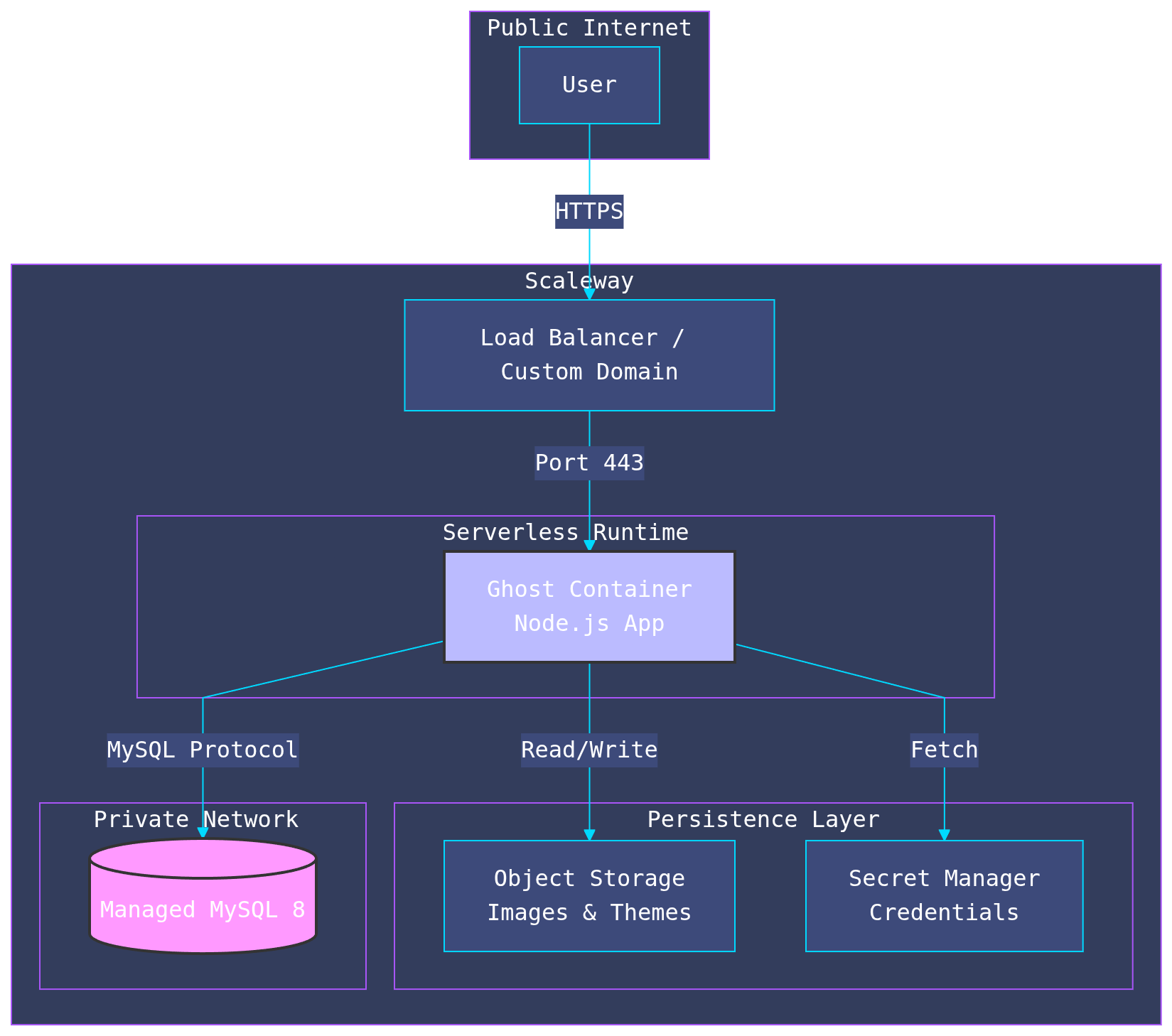
The core challenge with deploying Ghost (or any traditional CMS) to a serverless environment is state. Serverless containers are ephemeral; they can spin up or down at any moment, and their local filesystem is wiped on restart.
Standard Ghost stores images, themes, and logs locally. To go serverless, we had to decouple these stateful components from the application logic.
The Stack
- Compute: Scaleway Serverless Containers (Autoscaling 1-5 instances)
- Database: Scaleway Managed MySQL 8 (Private Network, zero public exposure)
- Storage: Scaleway Object Storage (S3-compatible) for media assets
- Container Registry: Scaleway Container Registry for Docker image storage
- Infrastructure as Code: Terraform
- Security: IAM, Secret Manager, and Private Networks
Note on Container Resources: The deployment creates two types of Scaleway resources with similar names:
- Container Registry Namespace - Stores your Docker images (you'll see storage usage in MB/GB)
- Serverless Container Namespace - Runtime environment where Ghost actually runs (shows 0 B storage - this is correct)
Both appear in the Scaleway Console under "Container Registry" → "Namespaces", which can be confusing. Both are required and serve different purposes:
- The Container Registry is like Docker Hub - it stores your built images
- The Serverless Container Namespace is like AWS Lambda - it runs your application using those images
You cannot eliminate one in favor of the other; this is Scaleway's standard serverless container architecture.
System Architecture Diagram
This high-level view shows how traffic flows from the user to the application, and how the application securely accesses its dependencies.
1. S3 Storage Integration: Custom Docker Setup
Ghost doesn't support S3 storage out of the box. While there are adapters available, integrating them into a containerized environment requires proper adapter initialization.
We use the non official ghost-storage-adapter-s3 package, installed directly into Ghost's content directory structure during the Docker build process. This ensures the adapter is properly loaded and initialized on startup.
The Dockerfile
View the complete Dockerfile on GitHub
FROM ghost:6-alpine

WORKDIR /var/lib/ghost

# Install the S3 storage adapter directly into the content directory structure
RUN npm install ghost-storage-adapter-s3 \
    && mkdir -p ./content.orig/adapters/storage \
    && cp -vr ./node_modules/ghost-storage-adapter-s3 ./content.orig/adapters/storage/s3

COPY docker-entrypoint-custom.sh /usr/local/bin/
RUN chmod +x /usr/local/bin/docker-entrypoint-custom.sh

ENTRYPOINT ["docker-entrypoint-custom.sh"]
CMD ["node", "current/index.js"]
Key Points:
- The adapter is installed directly into
./content.orig/adapters/storage/s3(Ghost's default location) - Installation happens during the Docker build, not at runtime
- This approach avoids initialization issues and ensures the adapter is ready before Ghost starts
The Custom Entrypoint (docker-entrypoint-custom.sh)
This minimalist script verifies S3 configuration and delegates to Ghost's original entrypoint:
View the complete entrypoint script on GitHub
#!/bin/sh
set -e

echo "--- Starting Ghost with S3 Storage ---"

# Verify S3 credentials are set
if [ -z "$storage__s3__accessKeyId" ]; then
    echo "WARNING: storage__s3__accessKeyId is not set"
fi

if [ -z "$storage__s3__secretAccessKey" ]; then
    echo "WARNING: storage__s3__secretAccessKey is not set"
fi

if [ -n "$storage__s3__bucket" ]; then
    echo "S3 Bucket: ${storage__s3__bucket}"
    echo "S3 Region: ${storage__s3__region}"
fi

echo "--- Executing Original Ghost Entrypoint ---"
exec docker-entrypoint.sh "$@"
Why This Works:
- By installing the adapter directly into Ghost's
content.origdirectory during the build, Ghost automatically discovers and loads it on startup - The entrypoint script is minimal—it only verifies credentials and logs configuration for debugging
- No runtime file copying is needed, reducing initialization overhead and potential failure points
2. Infrastructure as Code: The Deployment Pipeline
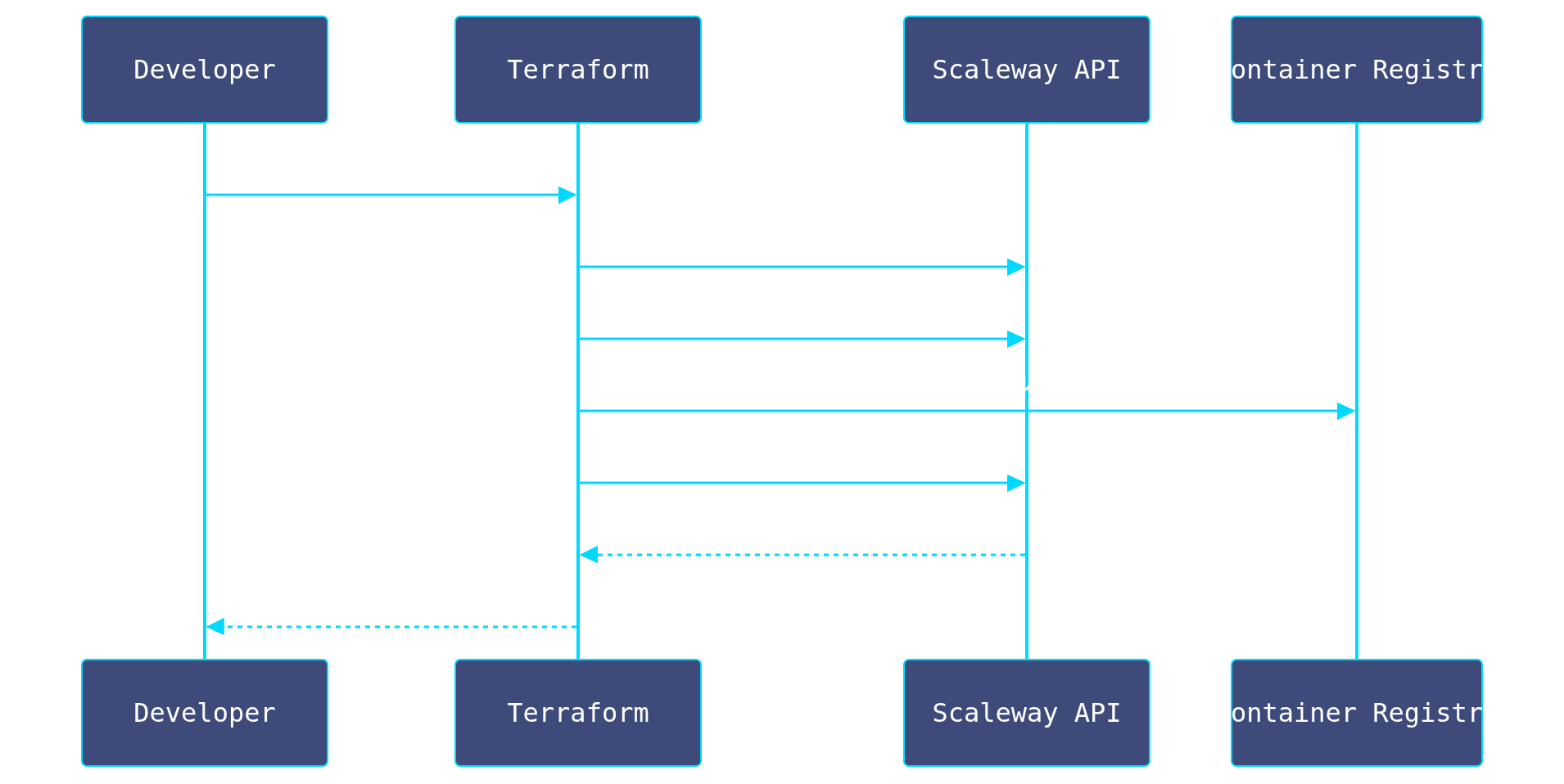
We didn't click buttons in a console. The entire infrastructure is defined in Terraform, ensuring reproducibility and disaster recovery. This approach allows us to treat our infrastructure exactly like our application code: versioned, reviewed, and automated.
Deployment Workflow
The Container Definition
We define the container with strict resource limits and auto-scaling rules. Notice how we inject configuration via environment variables, keeping the image generic.
View the complete Terraform container configuration on GitHub
resource "scaleway_container" "ghost" {
  name            = var.app_name
  namespace_id    = scaleway_container_namespace.main.id
  registry_image  = "${scaleway_registry_namespace.main.endpoint}/ghost-s3:latest"
  port            = 2368
  cpu_limit       = 1000
  memory_limit    = 1024
  min_scale       = 1
  max_scale       = 5
  timeout         = 600

  # Connect to the Private Network for secure DB access
  private_network_id = scaleway_vpc_private_network.main.id

  environment_variables = {
    "NODE_ENV"             = "production"
    "url"                  = var.custom_domain != "" ? "https://${var.custom_domain}" : "https://${var.app_name}-${scaleway_container_namespace.main.id}.functions.fnc.${var.region}.scw.cloud"
    "storage__active"      = "s3"
    "storage__s3__region"  = var.region
    "storage__s3__bucket"  = scaleway_object_bucket.content.name
    "storage__s3__endpoint"      = "https://s3.${var.region}.scw.cloud"
    "storage__s3__forcePathStyle" = "true"
    "session__trust_proxy"       = "true"
    "session__path"              = "/"
    "mail__transport"            = "SMTP"
    "mail__options__host"        = var.mail_smtp_host
    "mail__options__port"        = var.mail_smtp_port
    "mail__options__secure"      = var.mail_smtp_secure
    "mail__options__auth__user"  = var.mail_smtp_user

  }

  # Sensitive data injected securely (DB, S3 keys, SMTP password)
  secret_environment_variables = {
    "database__connection__password" = local.db_app_password
    "storage__s3__accessKeyId"       = scaleway_iam_api_key.ghost_s3_key.access_key
    "storage__s3__secretAccessKey"   = scaleway_iam_api_key.ghost_s3_key.secret_key
    "mail__options__auth__pass"      = base64decode(scaleway_secret_version.smtp_password.data)

  }
}
Mid-Article Insight: Ready for Production?
If you want this architecture pre-packaged as a reusable Terraform module, we can share a sanitized template along with IAM least-privilege policies. Get the Terraform module template + security policy examples—just ask us during a quick intro call.
3. Security Deep Dive: Network Isolation
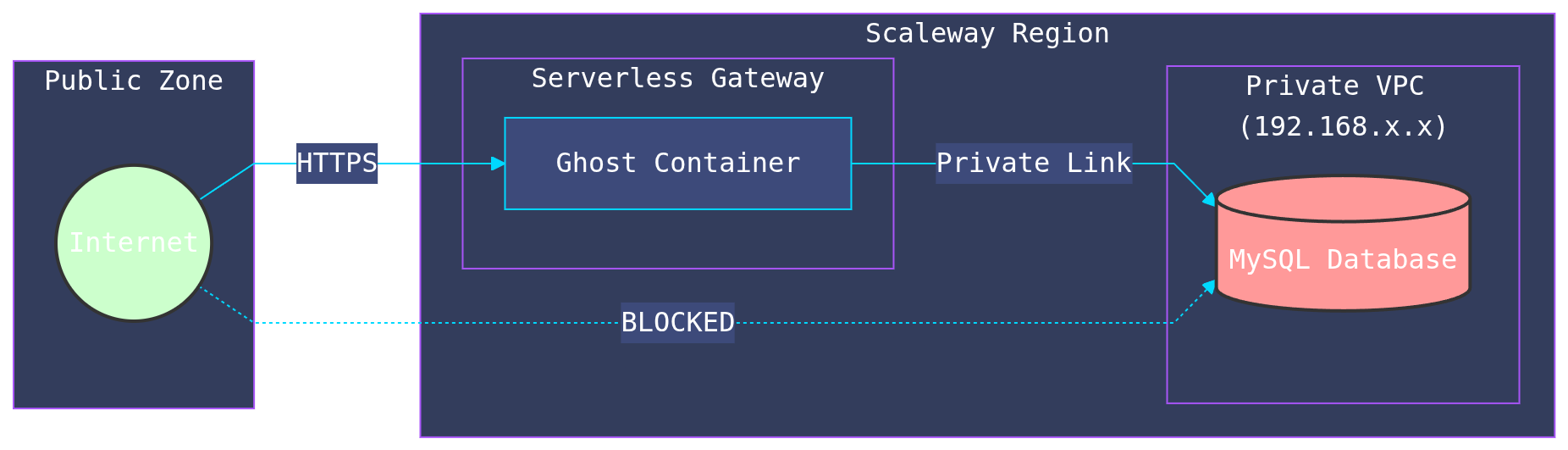
One of the most critical aspects of this deployment is the Private Network. In a naive serverless setup, you might expose your database to the public internet to allow the container to reach it. This is a major security risk.
We utilized Scaleway's VPC integration to keep the database completely isolated.
Key Security Features
- Private Networking: The database has no public IP address. It is only accessible from resources within the specific Private Network ID.
- Least Privilege IAM: Instead of using a root account, we create a dedicated IAM Application for the Ghost container. It has permissions only for the specific S3 bucket it needs to write to.
- Secret Management: Database passwords, S3 keys, and SMTP credentials are never hardcoded. They are generated randomly by Terraform, stored in the Scaleway Secret Manager, and injected into the container at runtime.
4. Performance & Cost Optimization
The "Cold Start" Dilemma
Serverless functions typically scale to zero when not in use. While this saves money, it introduces "cold starts"—the first user to visit the blog after a period of inactivity would wait 5-10 seconds for the container to boot.
For a blog, this is unacceptable. We configured min_scale = 1 in our Terraform definition. This keeps one "warm" instance running 24/7, ensuring instant page loads, while still allowing the system to burst up to 5 instances during traffic spikes.
Cost Breakdown
This architecture is surprisingly affordable compared to a managed VPS with similar redundancy:
- Compute: ~€29/month (for the always-on instance with 1 vCPU & 1GB RAM)
- Database: ~€18/month (Managed MySQL 8, db-dev-s)
- Storage: Pennies per GB
Totaling roughly €47/month, you get a setup that would require a dedicated DevOps engineer to maintain on a traditional server.
5. Operations: Monitoring, Backups, and Upgrades
Production-grade infrastructure requires more than code—it needs observability, resilience practices, and upgrade paths. Here's what you need to implement:
Monitoring & Alerting
- Container metrics: CPU, memory, request latency, error rates via Scaleway Console or CloudWatch-compatible integrations
- Application logs: Enable Ghost logging to CloudWatch or a syslog drain; set alerts on 5xx errors and critical logs
- Uptime checks: External HTTP(S) monitoring (e.g., UptimeRobot) with Slack/email notifications
- Database health: Monitor MySQL connection pool utilization, slow query logs, replication lag (if applicable)
Backup & Disaster Recovery
- Database: Scaleway Managed MySQL supports automated snapshots; enable daily backups with 7-day retention minimum
- Object Storage: Enable object versioning on the S3 bucket for media assets; test monthly restore procedures
- Infrastructure: Terraform state is version-controlled; snapshots can be restored if a resource is corrupted
- A/B testing & rollback: Tag container images by Ghost version (e.g.,
ghost:6.0.1-prod); plan major version upgrades with a blue/green deployment
Ghost Version Upgrades
- Patch updates (e.g., 6.0.0 → 6.0.1): Safe to deploy directly via Terraform image tag update
- Minor updates (e.g., 6.0 → 6.1): Test in a staging container first; plan for a 5–10 min cutover window
- Major updates (e.g., 5 → 6): Perform a full backup, test in staging, then blue/green deploy with a rollback plan
- Migration testing: Shadow database snapshots to test migrations without affecting production
6. Tradeoffs & Comparison
How This Approach Stacks Up
| Aspect | VPS + Docker | Managed PaaS | Scaleway Serverless (This) |
|---|---|---|---|
| Ops load | Medium | Low | Low |
| Monthly cost | €25–€50 | €100–€200+ | €47 |
| Auto-scaling | Manual | Good | Automatic |
| Cold starts | None | Rare | None (min_scale=1) |
| Security | Manual hardening | Good defaults | Private network + IAM |
| Lock-in risk | Low | Medium–High | Low–Medium |
| Patching burden | High | None | None |
Best for: Content teams that value low ops overhead and predictable costs over maximum flexibility.
7. Known Limitations & Configuration Requirements
This architecture is powerful, but it's not suitable for every scenario. Be aware of these constraints:
Critical Configuration Notes
Authentication & Proxy Handling (Jan 2026 Update):
- Ghost 6.10.3+ introduced mandatory 2FA device verification for staff accounts
- The serverless deployment disables device verification by default (
security__staffDeviceVerification = false) to avoid lockout until SMTP is confirmed working end-to-end - Three session-related settings are critical for serverless proxy environments:
session__trust_proxy = true— Tells Ghost to trust X-Forwarded-* headers from Scaleway's proxysession__secure = true— Enforces secure HTTPS cookiessession__path = "/"— Sets correct cookie path for authentication
- If you enable 2FA later, you must configure SMTP/email (SendGrid, Mailgun, etc.)
Mail Configuration:
Ghost uses SMTP to send emails (staff invitations, password resets, and—if enabled—device verification / 2FA flows). In this deployment, SMTP is configured via Terraform variables, and the SMTP password is stored in Scaleway Secret Manager (not committed in Git).
Terraform variables (set in terraform/terraform.tfvars, using terraform/terraform.tfvars.example as a template):
mail_from_name— Display name for outgoing emails (e.g., "My Ghost Blog")mail_from_email— Sender email address (e.g., "noreply@blog.example.com")mail_smtp_host— SMTP server hostname (e.g., "smtp.eu.mailgun.org")mail_smtp_port— SMTP server port (typically "587" for STARTTLS)mail_smtp_secure— Use TLS/SSL ("false" for STARTTLS on port 587)mail_smtp_user— SMTP authentication usernamemail_smtp_password— SMTP password (stored in Scaleway Secret Manager and injected into the container)
Security: the SMTP password is stored as a Scaleway Secret and injected into Ghost as mail__options__auth__pass.
Important: do not commit terraform.tfvars; the example file is provided as a template.
Other Limitations
- Adapter maintenance: The S3 adapter is community-maintained; monitor its repository for updates and test new versions in staging
- Database connection limits: Managed MySQL has connection pool limits; configure Ghost's connection pooling to avoid exhaustion
- Ghost upgrades require container rebuild: Major version bumps may require code changes; plan for downtime during large migrations
- Search indexing: Ghost's built-in search doesn't scale well; consider external search solutions (Elasticsearch, Meilisearch) for large publications
- Large file uploads: S3 bucket limits and timeouts apply; configure max upload size in Ghost config
When NOT to use this approach:
- You need zero downtime during Ghost major version upgrades
- You require global CDN distribution for images and themes (add Cloudflare or Scaleway CDN in front)
- Your backup / compliance requirements exceed standard snapshots (implement PITR and audit logging separately)
Why This Matters
This architecture offers significant advantages over a traditional VPS:
- Zero Maintenance: No OS updates, no patching Nginx, no manual backups.
- Auto-Scaling: The blog can handle traffic spikes automatically by spinning up more containers.
- Resilience: If a container crashes, a new one replaces it instantly.
- Infrastructure as Code: The entire setup is documented and versioned in Git.
- Cost-Effective at Scale: You only pay for actual usage; a lightly-trafficked blog pays pennies for overages.
Key Takeaways
- Stateless design is the foundation of serverless Ghost—decouple media, database, and secrets from the container.
- Private networking keeps your database secure; never expose MySQL to the public internet.
- Infrastructure as Code ensures reproducibility and enables disaster recovery without manual effort.
- Monitoring and backups are non-negotiable for production workloads—don't skip them.
- Cost advantage is real (~€47/month), but only if you avoid common pitfalls (cold starts, lock-in, upgrade friction).
FAQ
Q: Does Ghost natively support S3 storage?
A: No. Ghost uses a pluggable storage adapter system. We use the community-maintained ghost-storage-adapter-s3 package. The Docker image installs it directly into Ghost's content directory during the build process, ensuring proper initialization. Always test new versions in staging.
Q: I'm getting "Access Denied" errors when uploading images.
A: This is typically caused by a missing S3 bucket policy. Scaleway Object Storage requires both IAM permissions (which grant access at the project level) and an explicit bucket policy (which grants access to the specific bucket). Ensure: (1) Terraform has applied the bucket policy: cd terraform && terraform apply, (2) Verify bucket policy exists in Scaleway Console under Object Storage > Your Bucket > Bucket Policy tab, (3) Your Docker image includes the S3 adapter in ./content.orig/adapters/storage/s3, (4) All S3 environment variables are set correctly as described in the README. See the troubleshooting section in the README for detailed steps.
Q: Why is my staff login failing with "Authorization failed"?
A: Ghost 6.10.3+ introduced mandatory 2FA device verification. If email isn't configured, staff accounts on new devices can't login. The serverless deployment disables this feature (security__staffDeviceVerification = false) for optional email setup. To enable 2FA, configure SMTP (SendGrid, Mailgun, etc.) and set security__staffDeviceVerification = true. Also ensure session__trust_proxy = true and session__path = "/" are set for proper session handling in proxy environments.
Q: How do you prevent cold starts?
A: Set min_scale = 1 in Terraform. This keeps one instance warm 24/7, ensuring <100ms first-byte latency. Cost is fixed at ~€29/month for one vCPU + 1 GB RAM.
Q: How is the database secured?
A: The MySQL instance has no public IP. It's placed in a private VPC, accessible only from the Ghost container via a private network link. Credentials are injected via Scaleway Secret Manager.
Q: How do you handle backups?
A: Scaleway Managed MySQL supports automated daily snapshots (7-day retention minimum). Object Storage versioning covers media assets. Terraform state is version-controlled in Git.
Q: What happens if Ghost has a major version upgrade?
A: Test the new version in a staging container with a database snapshot. Plan a 5–10 minute cutover window. Use Terraform to tag the image and trigger a blue/green deployment. Keep the old image tag until rollback is no longer needed.
Q: Can you use this with a custom domain?
A: Yes. Point your domain to the Scaleway Load Balancer endpoint; the container receives https://yourdomain.com in the url environment variable.
Q: What if traffic spikes suddenly?
A: The autoscaler will spin up additional instances (up to 5 by default) within seconds. Scaling is automatic and transparent; no manual intervention needed.
Q: Can I enable email / 2FA later?
A: Absolutely. The deployment starts with email optional (and 2FA disabled) for simplicity. When you're ready: (1) Set SMTP variables in terraform.tfvars, (2) Apply Terraform to inject the mail env vars and SMTP secret, (3) Set security__staffDeviceVerification = true, (4) Redeploy. Test in staging first. Test in staging first to ensure email sending works before enabling for all staff.
Next Steps
-
Start with the basics: Clone or fork the serverless-ghost-blog repository. Update variables for your domain, region, and credentials using the
terraform.tfvars.exampleas a template. -
Test locally first: Build the Docker image locally to validate the
Dockerfileanddocker-entrypoint-custom.shlogic before deploying to Scaleway. -
Deploy and monitor: Run
terraform applyand monitor the first 24 hours for database connection issues, slow queries, or adapter errors. -
Implement backups & monitoring: Set up Scaleway snapshot policies and external uptime monitoring immediately after launch.
-
Plan for upgrades: Document your current Ghost version; test a staging upgrade before applying it to production.
Want a Production-Ready Terraform Module?
If you'd like a pre-built, reusable Terraform module (with IAM policies, networking boilerplate, and deployment automation), plus a threat model and least-privilege policy examples, reach out to Polynom for a 20-minute architecture review.
What Polynom Does
We build and deploy data and AI products at scale. If you're launching a Ghost publication as part of a larger platform—or you need serverless foundations for custom AI/ML workloads—we bring the same rigor we've shown here:
- Secure serverless deployments for AI inference workloads (LLMs, embeddings, fine-tuning pipelines)
- Data platform architecture (ETL, data lakes, real-time analytics)
- Infrastructure modernization (monolith → microservices, on-prem → cloud)